Jira Roadmaps: Simplifying Complex Projects
Table of Contents
Project management in today’s dynamic business environment demands tools that offer clarity, flexibility, and scalability. One such tool that stands out is Jira Roadmaps. Jira Roadmaps play a crucial role in simplifying complex projects by providing a clear visual representation of project timelines, tasks, and dependencies.
This blog post will explore what Jira Roadmaps are, their main features, the differences between basic and advanced roadmaps, how to set them up, customization options, best practices, and an FAQ section to address common questions. By the end, you’ll have a comprehensive understanding of how to leverage Jira Roadmaps for effective Agile project management.
Please note that Jira’s roadmaps have recently been renamed Jira Timelines. Depending on your version of Jira, you might see either one of these names, jira roadmap or jira timeline.
What Are Jira Roadmaps? #
Jira Roadmaps are a visual representation of your project’s timeline, designed to help you manage and track large bodies of work across multiple teams. Contrary to the granular approach of conventional project plans with individual task assignments and detailed milestones, roadmaps take a higher-level overview of your project’s progress, including individual tasks, dependencies, and key milestones. These roadmaps are crucial for project managers who need to ensure that every team member is aligned with the project’s goals and timelines.
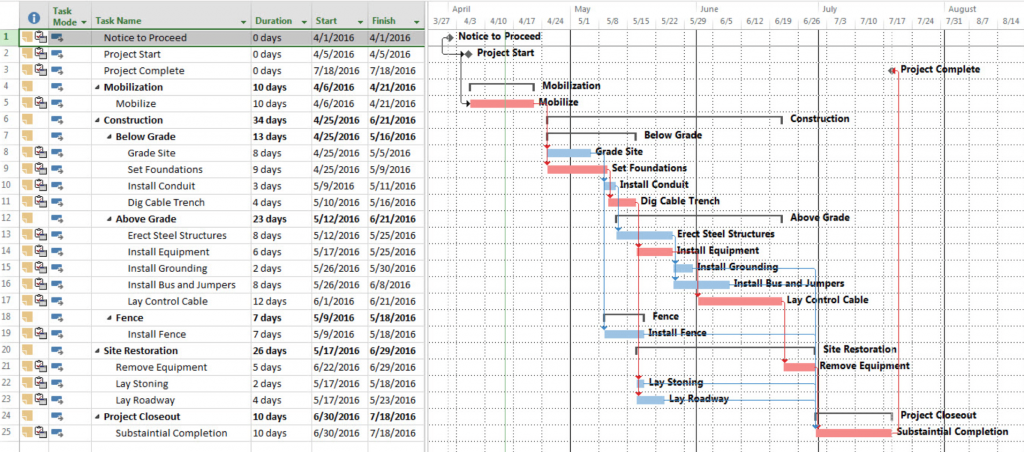
Roadmaps concentrate on prominent features and projects, presenting them on a broad timeline that spans months, quarters, or even years. They offers stakeholders a comprehensive understanding of strategic direction without the clutter of intricate task-level data.
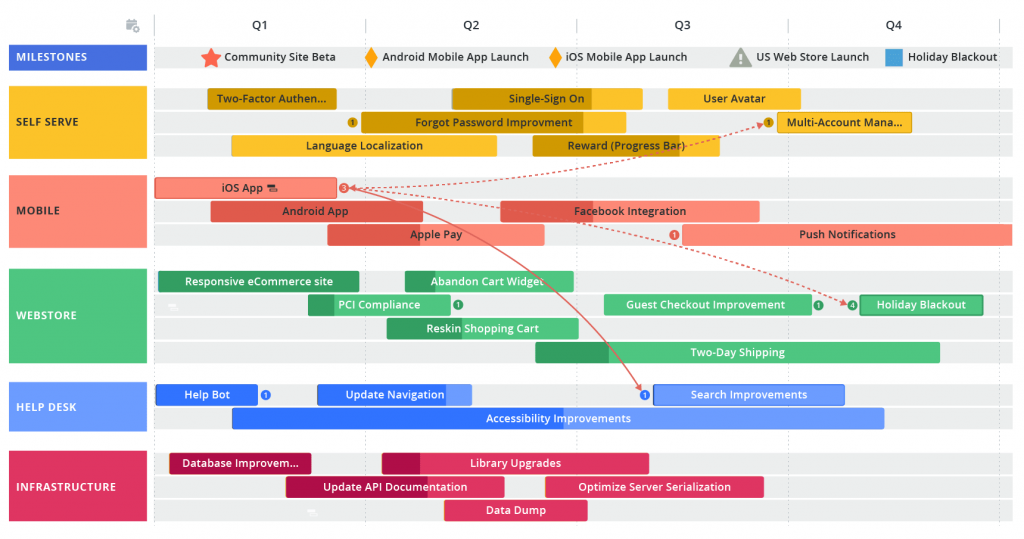
Initially, Jira was not designed with Roadmaps. This feature was a later addition, initially made available for next-gen projects. Due to its success and demand, it gained popularity rapidly, prompting Atlassian to incorporate it into classic projects and enhancing Jira’s project management capabilities.
Key Features and Components of Jira Roadmaps #
Visual Timeline: #
Jira Roadmaps offer a timeline view that displays your project’s start date, due date, and overall progress. This visual timeline helps project managers to easily track the progress of each task and identify potential delays.
Epics, Stories, and Tasks #
You can create roadmaps that include various issue types, such as epics, stories, and tasks, helping to organize work at different hierarchy levels. This hierarchy allows for better organization and management of both large and smaller tasks within the project.
Dependencies and Milestones #
Jira Roadmaps allow you to map dependencies between tasks and set key milestones to track progress effectively. By visualizing these dependencies, teams can better understand how their work impacts other tasks and the overall project timeline.
Child Issues #
A unique feature of Jira Roadmaps is the ability to add child issues to parent tasks, allowing for detailed planning and tracking of smaller tasks that contribute to larger goals. This helps in breaking down complex tasks into manageable parts.
Integration with Jira Issues #
Jira Roadmaps integrate seamlessly with Jira issues, enabling you to link tasks directly to your roadmap. This integration ensures that all project details are easily accessible and up-to-date.
Hierarchy Levels #
Jira Roadmaps support multiple hierarchy levels, making it easier to manage large projects with several layers of tasks and sub-tasks. This hierarchical structure provides a clear picture of how smaller tasks contribute to larger goals.
Gantt Charts #
The visual representation of the project timeline in the form of Gantt charts makes it easier to manage and track progress. Gantt charts provide a clear overview of the project schedule, helping teams stay on track.
Capacity Planning #
Advanced Jira Roadmaps include capacity planning features that help in managing team capacity and ensuring that resources are allocated efficiently. This feature is essential for larger projects that require detailed planning and resource management.
Cross-Project Releases #
For organizations managing multiple projects, the cross-project releases feature in advanced roadmaps is invaluable. It allows for the coordination and tracking of releases across different projects, ensuring that dependencies are managed effectively.
Customization Options #
Jira Roadmaps offers extensive customization options, including custom fields, filters, color coding, and tags. These options help tailor the roadmap to meet specific project needs and enhance visibility.
Sharing and Exporting #
Jira Roadmaps can be easily shared with external stakeholders by exporting them as PDFs or CSV files. This feature ensures that all stakeholders are kept informed about the project’s progress.
Integration with Other Tools #
Jira Roadmaps integrate with other tools such as Confluence, Slack, and various Atlassian Marketplace apps. This integration enhances collaboration and ensures that all project information is accessible from a single platform.
Advanced vs. Basic Jira Roadmaps #
Jira offers both basic and advanced roadmaps, each tailored to different project needs.
Basic Roadmaps #
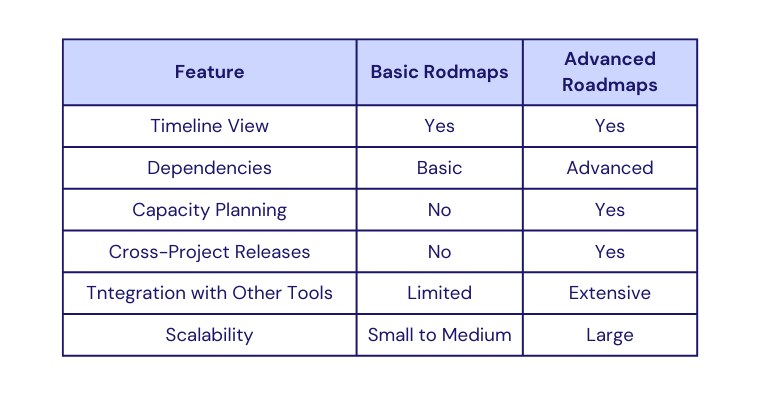
- Core Functionalities: Basic roadmaps provide essential features such as creating and tracking epics and tasks, setting start and due dates, and visualizing timelines.
- Limitations: Basic roadmaps may not support more complex features like capacity planning or cross-project releases.
Advanced Roadmaps #
- Additional Features: Advanced roadmaps, available with Jira Software Premium and Jira Data Center, include capacity planning, advanced dependency management, and support for multiple teams and projects.
- Use Cases: Advanced roadmaps are ideal for larger, more complex projects that require detailed planning and tracking.
Comparison Chart:
How to Set Up Jira Basic Roadmap #
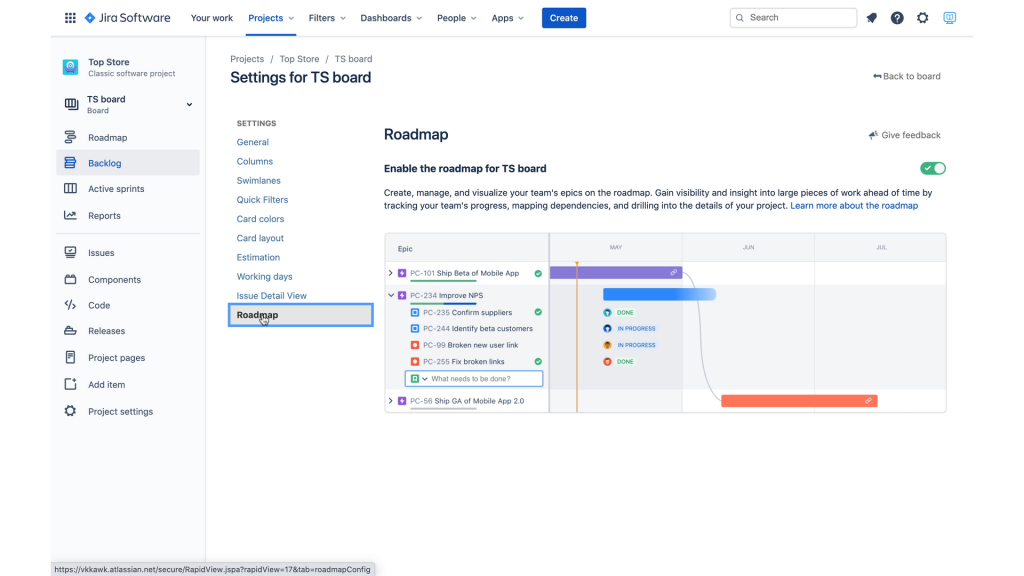
The activation of Jira Basic Roadmaps is a simple task. Within your Classic Jira project, you’ll need to first make sure Roadmap/Timeline is enabled in the Features section of Project Settings. Then you would navigate to the Board Configuration screen and toggle the Roadmap/Timeline option on. For a step-by-step guide, the official Atlassian Guide.
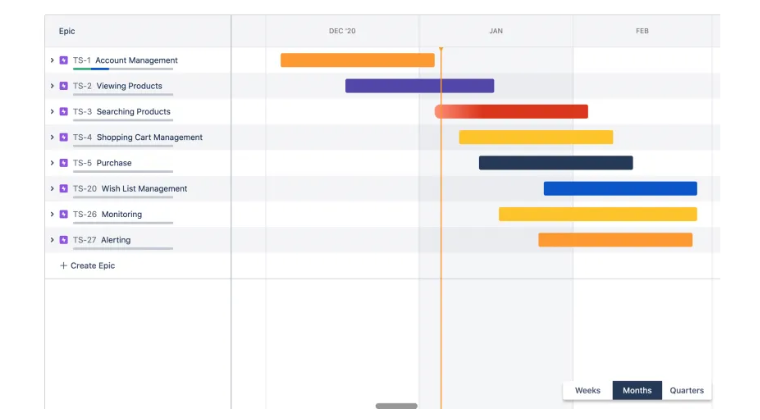
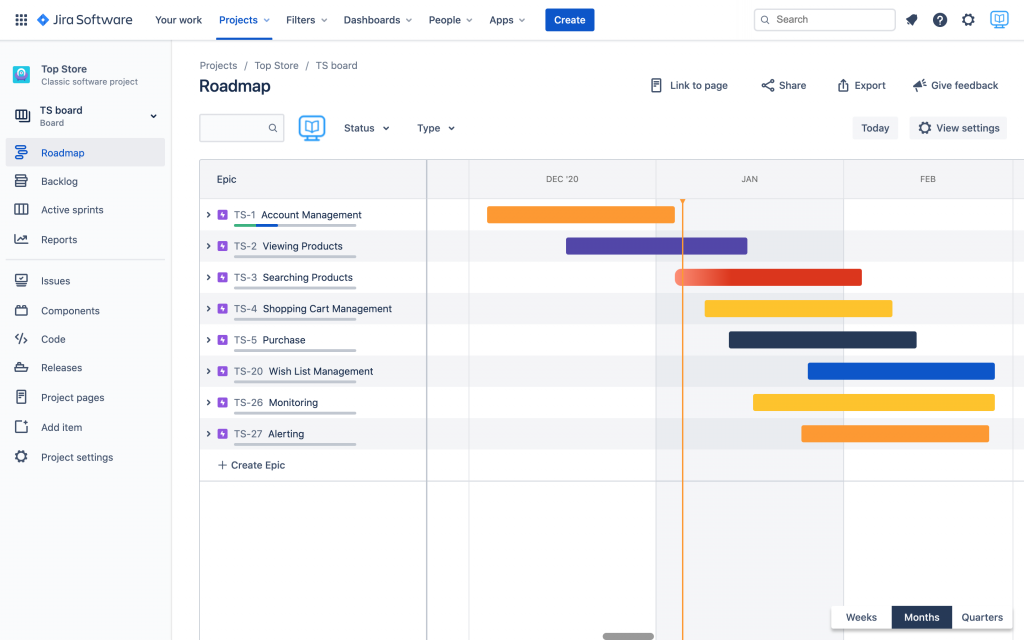
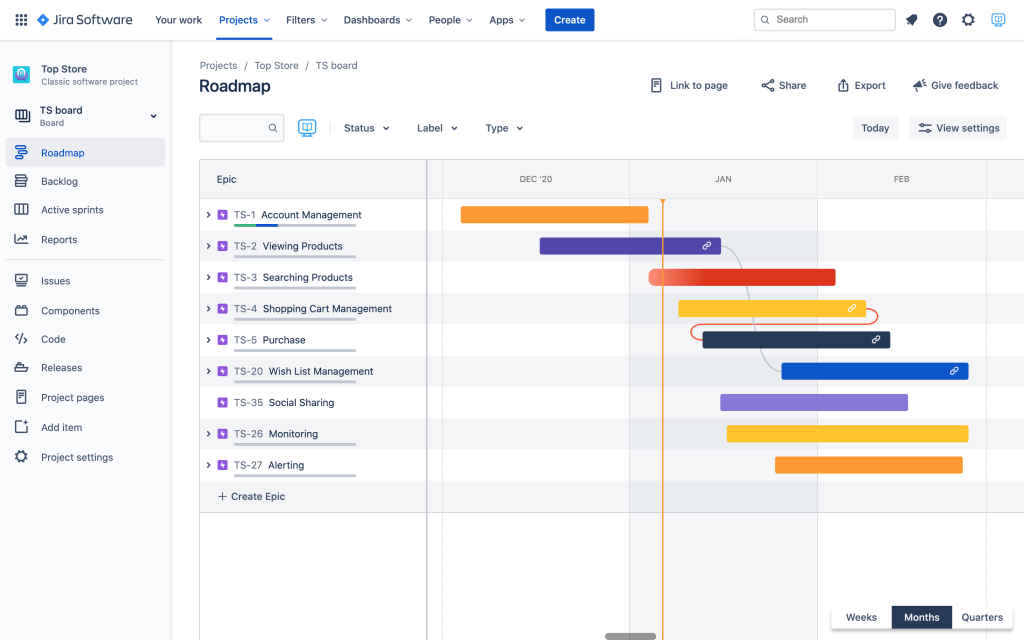
The roadmap for a hypothetical e-commerce website is shown in the example below. One of the defining features of Jira Roadmaps is that they represent significant features and initiatives as Jira epics. This allows for seamless visualization and tracking of progress, enhancing roadmap readability and enabling stakeholders to predict when each epic will be delivered and understand how the delivery of one impacts others.
Utilizing Jira Roadmaps for Efficient Project Management #
Epics in Roadmaps #
You can add a new epic without leaving the screen by just clicking the “Create Epic” link. The inline editor opens. Type in the name of the epic, and it will be created and added to the roadmap.
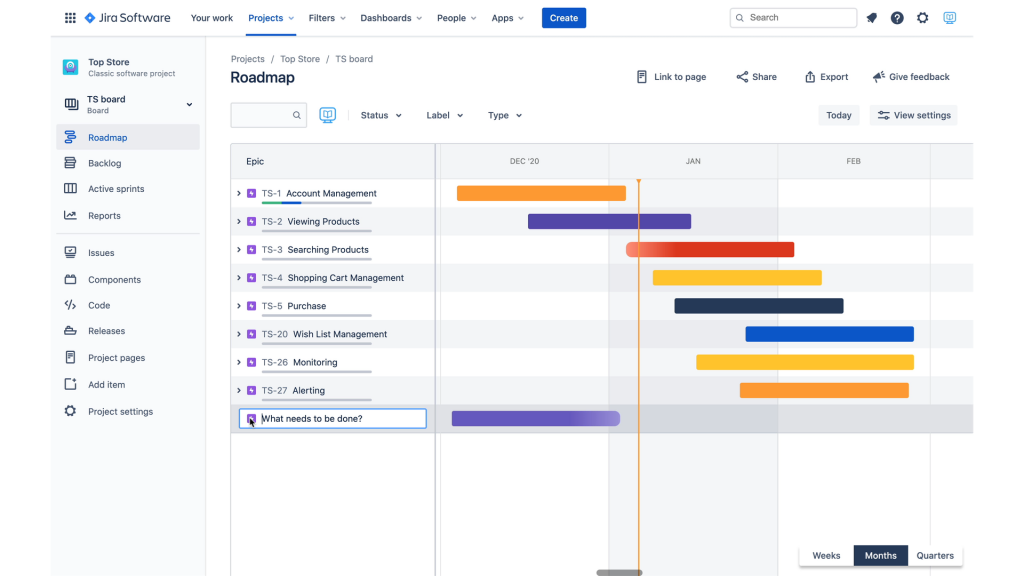
This screen also has a few extra features. You can drag epics up and down to arrange them in order of priority. Depending on the project’s nature and duration, you can choose weekly, monthly, or quarterly timescales for roadmap visualization. Using the export feature, you can also save the roadmap as a PNG file.
Stories, Tasks and Bugs in Roadmaps #
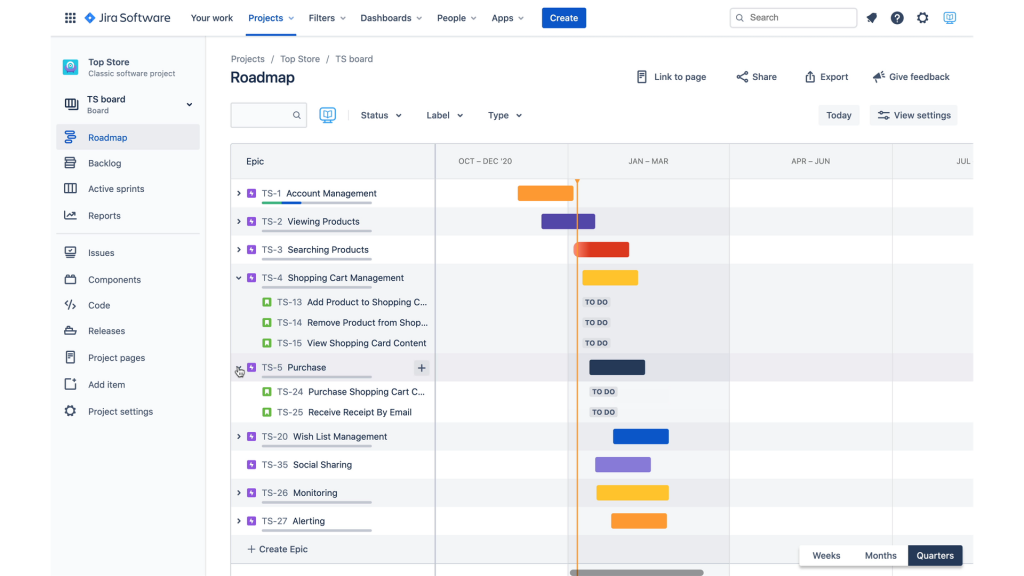
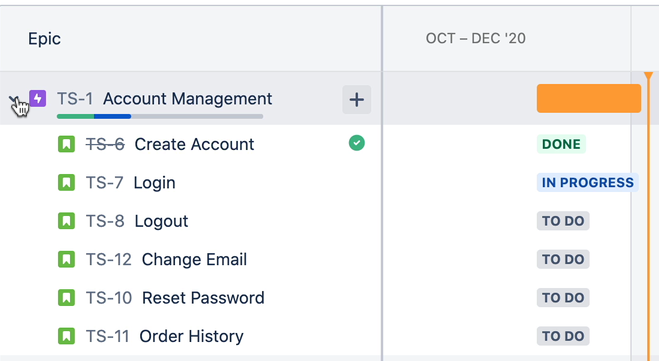
Jira epics contain stories, tasks, and bugs. That is not a roadmap feature; it is a Jira feature that has been around for a long time. However, that relationship is shown differently on the roadmap screen. You can expand an epic to see its children, and you can create a new child issue by clicking the plus sign next to the epic’s name. This action also allows inline editing.
Progress Indicators in Roadmaps #
The roadmap shows Epic’s progress, and the status of its child issues is used to evaluate it. Under Account Management epic, there are blue and green bars. The green bar shows how many child issues are done, while the blue one shows how many are still being worked on.
Dependencies Between Epics #
One of the unique aspects of Jira Roadmaps is their ability to visually represent dependencies between epics. This feature is instrumental in ensuring that teams understand the interlinked nature of tasks and the impact of their progress on overall project delivery.
Personalizing Roadmaps for Strategic Visibility #
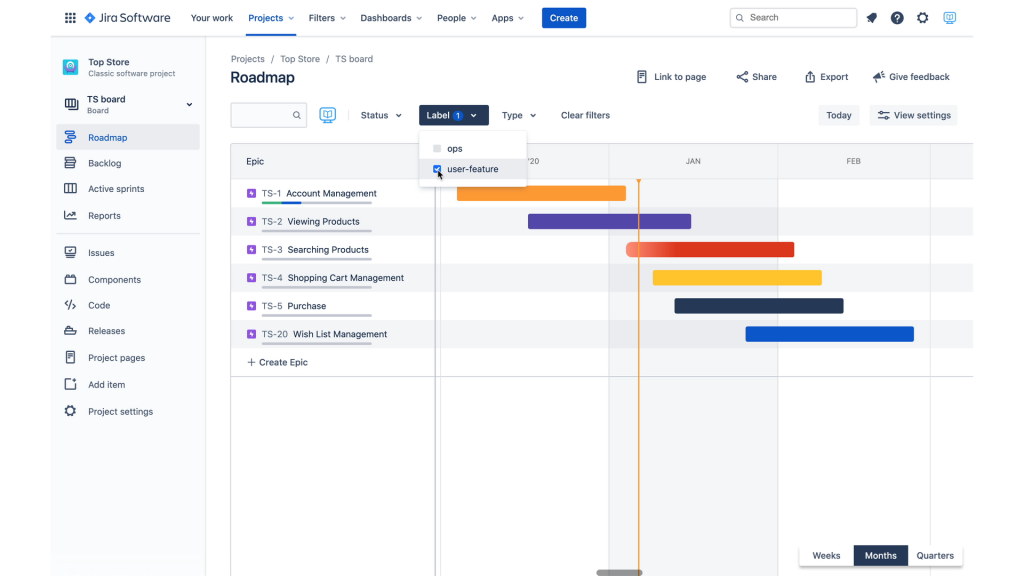
One of the standout features of Jira Roadmaps is their personalization capability. With the ability to create label filters, you can customize your roadmap to display the most relevant information for different teams or stakeholders.
Adding suitable labels to your epics activates the label filter, enabling you to swiftly switch between various roadmap views. This feature ensures that every team focuses on the data most relevant to their roles and bolsters project efficiency.
For example, the marketing team would like to know when reviews and wish lists will be available so that they can plan their marketing campaigns accordingly. At the same time, they don’t care much about monitoring and alerting or load testing schedules.
All epics supporting user features get the user-feature label, while those supporting operational features get the ops label. Adding labels to epics enables the label filter, so we can quickly switch between different views for different audiences.
Best Practices for Jira Roadmaps #
To maximize the effectiveness of your Jira Roadmaps, follow these best practices.
Aligning Roadmaps with Project Goals: #
Ensure that your roadmap reflects the larger goals of the project and the organization. This alignment helps maintain focus and achieve desired outcomes.
Maintaining Clarity and Simplicity: #
Keep your roadmap simple and easy to understand. Avoid cluttering it with too much information, which can overwhelm team members and stakeholders.
Regularly Reviewing and Updating Roadmaps: #
Schedule regular reviews to update the roadmap based on progress and any changes in project scope or priorities.
Encouraging Team Collaboration and Feedback: #
Foster a collaborative environment where team members feel comfortable sharing their input and feedback on the roadmap.
Leveraging Jira’s Reporting and Analytics Features: #
Use Jira’s reporting tools to gain insights into project performance and identify areas for improvement.
Frequently Asked Questions (FAQ) #
What is a Jira Roadmap? A Jira Roadmap is a visual representation of your project’s timeline, showcasing the progress and dependencies of tasks and epics. It helps in planning, tracking, and managing projects efficiently.
How do Jira Roadmaps help in Agile project management? Jira Roadmaps provide clear visibility into project progress, help in resource allocation, and improve team collaboration by aligning everyone on the project’s goals and timelines.
What is the difference between Basic and Advanced Jira Roadmaps? Basic Jira Roadmaps offer fundamental planning features, while Advanced Roadmaps include more sophisticated tools for managing larger, more complex projects, such as capacity planning and advanced dependency management.
How can I customize my Jira Roadmap? You can customize your Jira Roadmap by adding custom fields, applying filters, and using color coding and tags to differentiate tasks and epics.
Can Jira Roadmaps be shared with external stakeholders? Yes, Jira Roadmaps can be exported in various formats like PDF and CSV, and shared through integrations with other tools such as Confluence and Slack.
What are some best practices for maintaining effective Jira Roadmaps? Best practices include aligning roadmaps with project goals, keeping them updated, maintaining simplicity, fostering team collaboration, and utilizing Jira’s reporting features for insights.
Conclusion #
Jira Roadmaps are an invaluable tool for simplifying complex projects and enhancing project management in Agile environments. By providing a clear visual representation of project timelines, tasks, and dependencies, they help teams stay aligned, manage resources efficiently, and achieve their project goals. Implementing Jira Roadmaps in your project management strategy can lead to better planning, improved collaboration, and successful project outcomes.
Start exploring Jira Roadmaps today and experience the benefits of a more organized and efficient project management process.