Mastering Jira Issue Types: A Comprehensive Guide
Table of Contents
Effective project management tools are essential in the fast-paced world of Agile development methodologies. Jira, a leading tool in this space, specifically for software projects, offers a robust system for tracking and managing various project elements. Central to this system are Jira issue types, which help teams organize, prioritize, and track work across different projects. Each Jira issue represents a piece of work that needs to be completed, and a specific issue type defines the nature of the work. This comprehensive guide will explore different default issue types in Jira Software, how to use them effectively, and how to make custom issue types in Jira to fit your team’s workflow.
Understanding Jira Issue Types #
What are Jira Issue Types? #
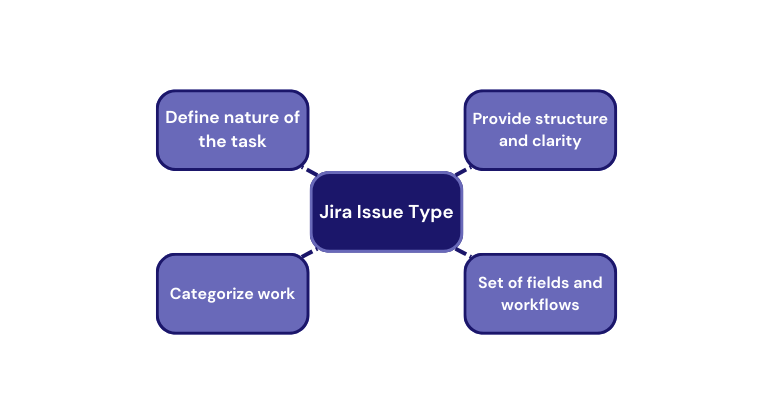
Jira Software issue types define the nature of a task within a project. They provide structure and clarity, allowing teams to categorize and manage different pieces of work. Each issue type has its own set of fields and workflows tailored to suit its specific purpose. Understanding these types is crucial for managing research projects, software development, and business projects effectively.
Standard Issue Types Explained #
Understanding the standard issue types in Jira is crucial for effectively managing projects and ensuring that work is categorized and tracked appropriately. These issue types serve as the building blocks for organizing tasks, tracking progress, and facilitating communication within teams. By leveraging the default hierarchy levels and utilizing these standard issue types, teams can streamline their workflow, maintain clarity in their processes, and achieve their project goals more efficiently. In this section, we will explore the core Jira issue types and their significance in project management.
Epic Issue Type #
An Epic is a large body of work that can be broken down into smaller tasks or stories. It represents a significant project milestone or a larger feature that will take multiple sprints to complete. For instance, developing a new feature for an e-commerce website might be categorized as an Epic. This helps teams to track progress over a longer period and ensures focused effort on larger objectives.
Story Issue Type #
A Story is a user-centric description of a feature or functionality. In Agile development methodologies, stories are typically prioritized based on their value to the team’s customers. For example, a story might describe a new feature that allows users to filter products on an e-commerce website. Stories help teams understand specific user stories and align their work with user needs.
Task Issue Type #
Tasks are used for regular business tasks that are not necessarily tied to new features or stories. These could include setting up a new server, preparing a presentation, or conducting a training session. Tasks help manage various elements of ongoing maintenance and operational work.
Sub Task Issue Type #
Subtasks are used to break down larger tasks into smaller, manageable pieces. For example, a task to “Develop User Authentication” might include sub-tasks for “Create Login Page,” “Implement Password Reset Functionality,” and “Integrate with OAuth Providers.” Sub-tasks help distribute work among team members and track progress on smaller components of a larger task.
Bug Issue Type #
Bugs represent issues in the software that need to be fixed. A bug could be a technical debt issue that causes a system crash or a user interface glitch that affects the user experience. Bugs are critical for maintaining the long-term quality of the software system and ensuring it meets user expectations.
Parent-Child Relationships in Jira Software #
Understanding Parent Issues and Child Issues #
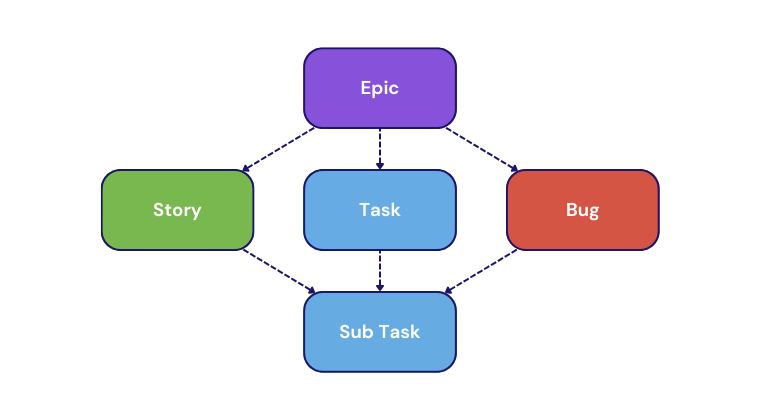
Jira’s issue hierarchy allows teams to organize work into parent issues and child issues. A parent issue, such as an Epic, can have multiple child issues, such as stories or tasks, linked to it. This parent-child relationship helps visualize the structure of work and track progress across different hierarchy levels. For instance, an issue like “Launch New Product Line” could have child issues for each feature or task required to achieve the launch.
How to Effectively Use Parent Issues and Child Issues #
Effectively managing parent and child issues involves creating a clear hierarchy and ensuring that each child issue is properly linked to its parent issue. This can be done by defining specific user stories as child issues under a parent Epic. This structure not only helps in tracking progress but also ensures that all elements of a larger effort are accounted for.
Customizing Jira Issue Types #
Introduction to Custom Issue Types #
While Jira’s default issue types cover a broad range of needs, teams often encounter scenarios that require customization. Custom issue types allow teams to tailor Jira to their specific workflow and project requirements. For example, a team might create their own issue types to manage different requests, like “Service Request” for IT support or “Research Issue” for tracking research projects.
How to Create Custom Issue Types in Jira #
Creating custom issue types in Jira is straightforward. Navigate to the Jira administration settings, select “Issues,” and then “Issue Types.” Here, you can create new issue types by defining their name, description, and any unique fields they might require.
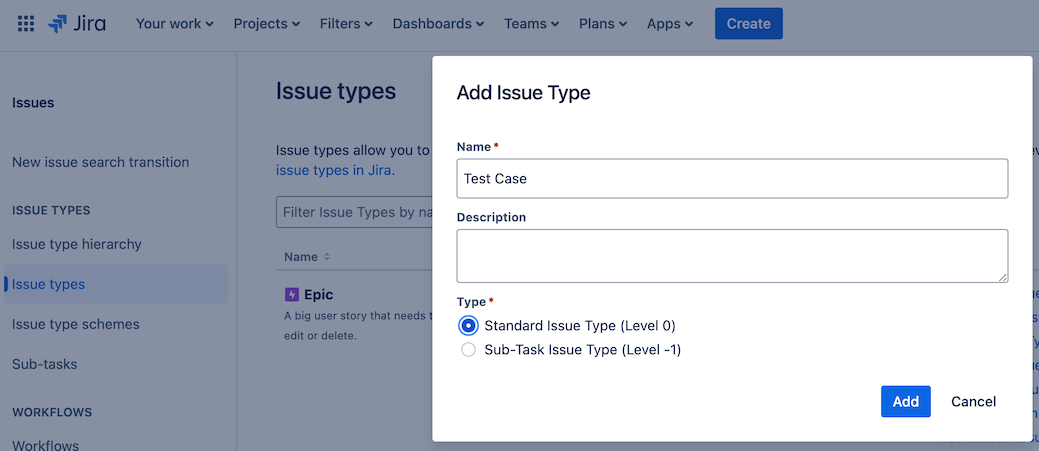
For instance, a “Test Case” custom issue type could include fields for test steps, expected results, and actual results. Custom issue types help address the unique needs of different projects and ensure that all work is properly categorized.
Breaking Down Requirements into Jira Issues #
How to Break Down Requirements into Jira Issues #
Breaking down requirements into Jira issues involves translating high-level project goals into actionable tasks. For example, assume you are working on a software project and are asked to close the remaining gaps in the user authentication system. Gaps include a lack of functionality for resetting a password and changing an email address. In addition, the phone number should be added to a user profile.
There are also known problems with allowing the space character in a user name and broken validation of the length of the user name. You are also asked to ensure that all user records that have not been active in the last five years are deleted and the user database is reindexed.
That information can be translated into a list of things that need to be done, something like this:
- Enable password reset
- Enable email address change
- Add phone number to a user profile
- The username should not allow space characters.
- Username length should be validated
- Delete users who have not been active in the last five years
- Re-index user database
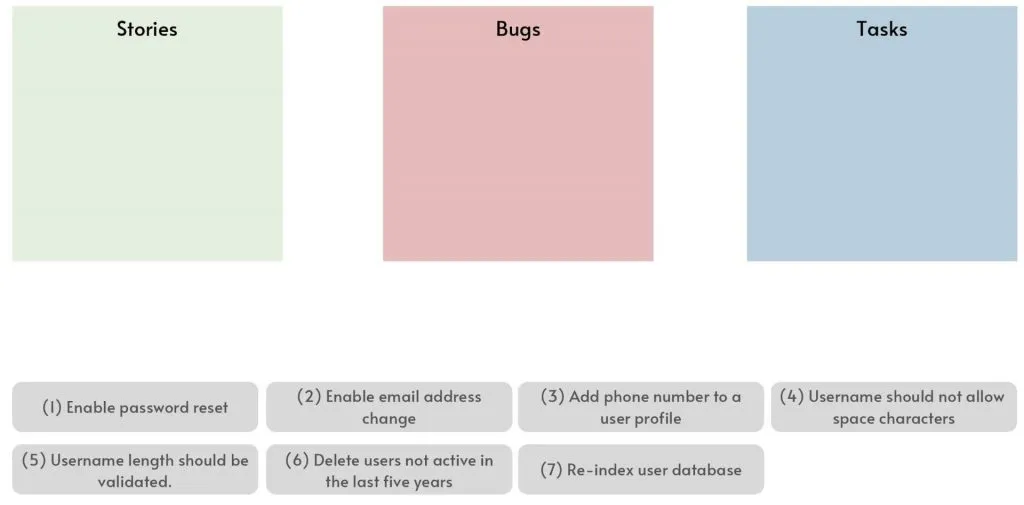
Although short, this list is the right candidate for tracking in Jira. Each item will become a Jira issue, but there are several issue types to choose from. Let’s review what these types are and how items from the list match them.
Determining the Correct Issue Type for Each Requirement #
Choosing the correct issue type for each requirement ensures that work is categorized appropriately and tracked efficiently. Use Epics for large, overarching goals, stories for user-centric features, tasks for operational activities, and sub-tasks for detailed components of larger tasks.
Identifying Stories #
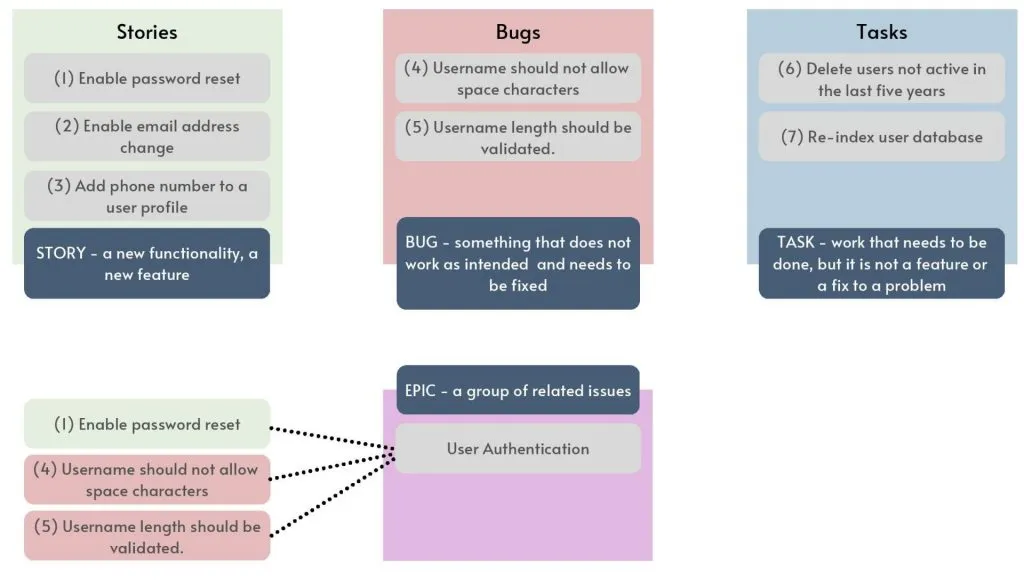
Earlier we established that the Story issue type describes a new feature or functionality that your users will care about. Looking through our list’s first three items, enabling password reset, email address change, and adding phone numbers certainly qualify as something users are interested in. Let’s mark them as stories.
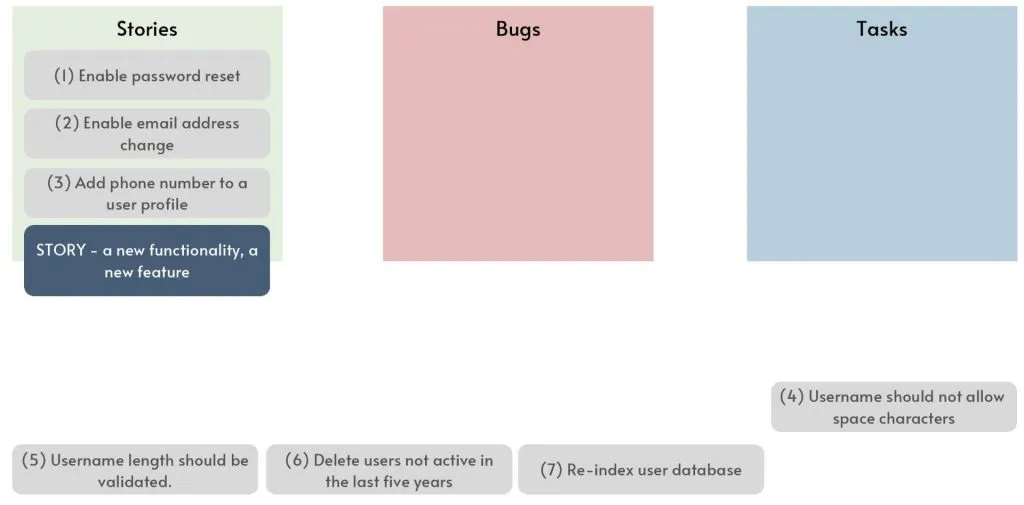
But what about the remaining items? Will users like your application more if spaces are allowed in usernames or if inactive users are deleted? Probably not, so items 4 to 7 are definitely not ‘story’ type.
Identifying Bugs #
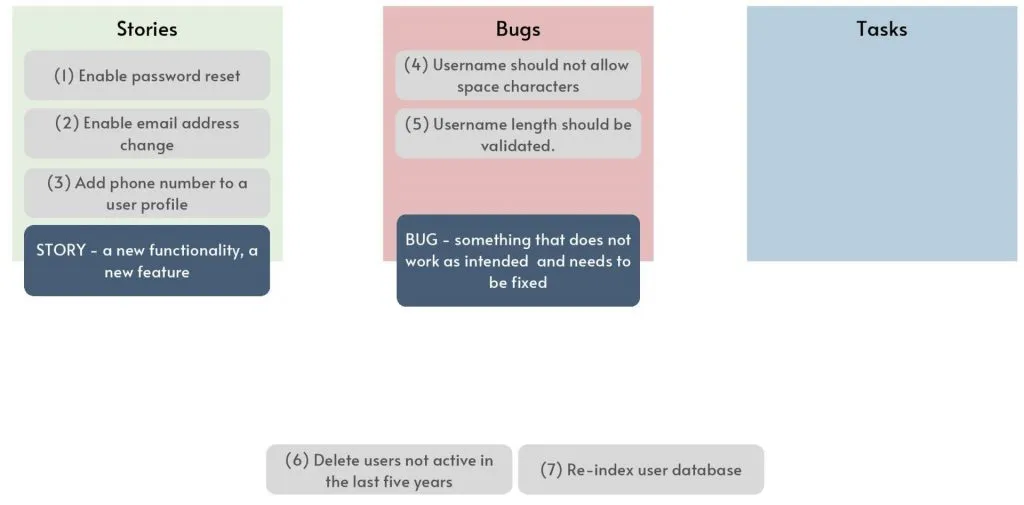
We described Bug issue type as representing something that does not work as expected in an existing feature and needs to be fixed, a problem we have and want to correct.
Items 4 and 5 clearly fall into that category. You wanted the length of the user name to be validated and space characters not allowed in it, but for whatever reason, it is not working and needs fixing. So, these two are becoming Bugs.
Identifying Tasks #
The last issue type is Task, which represents work that needs to be completed. It is not a feature that users care about, and it is not a fix for something that is currently not working as expected. The last two, items 6 and 7, qualify because you they need to be completed them to keep the app in good health, not to correct a problem or to please a user.
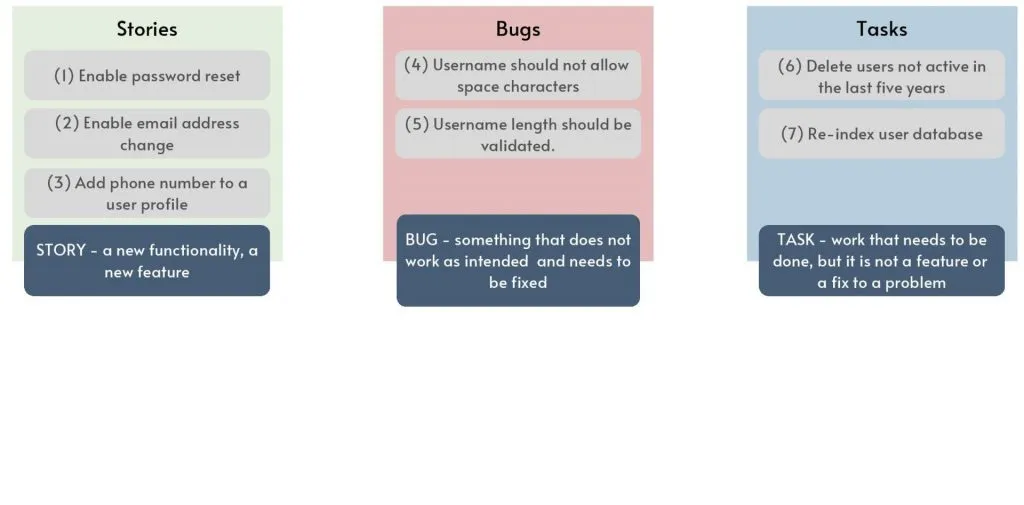
We mapped all our items in the list, but there is still one more issue type – the Epic type.
Identifying Epics #
Often, we refer to a group of features as a feature, assuming it is clear to everyone that there is some hierarchy in place. For example, ‘shopping cart’ is a common feature in e-commerce applications. Still, there is a set of features that all belong to the shopping cart, such as ‘adding items to the cart’, ‘removing items from cart’, ‘adding multiple items’, ‘showing related items’ and many more.
That is where Epic becomes useful. It is used to group related issues under one umbrella issue. In the previous example, the ‘shopping cart’ will become an Epic, and all other items mentioned, like adding and removing products to and from the shopping cart, will be stories or different issue types.
Let’s see how to apply that to our example. When discussing username and password, that is all part of user authentication functionality, which becomes epic. Items 1, 4, and 5 seem to be a good fit for that, and they should all belong to the User Authentication epic.
User Profile functionality is about maintaining a user record, including name, address, phone number, etc. Items 2 and 3, email address change, and phone number are definitely part of that, so let’s relate them to the User Profile epic.
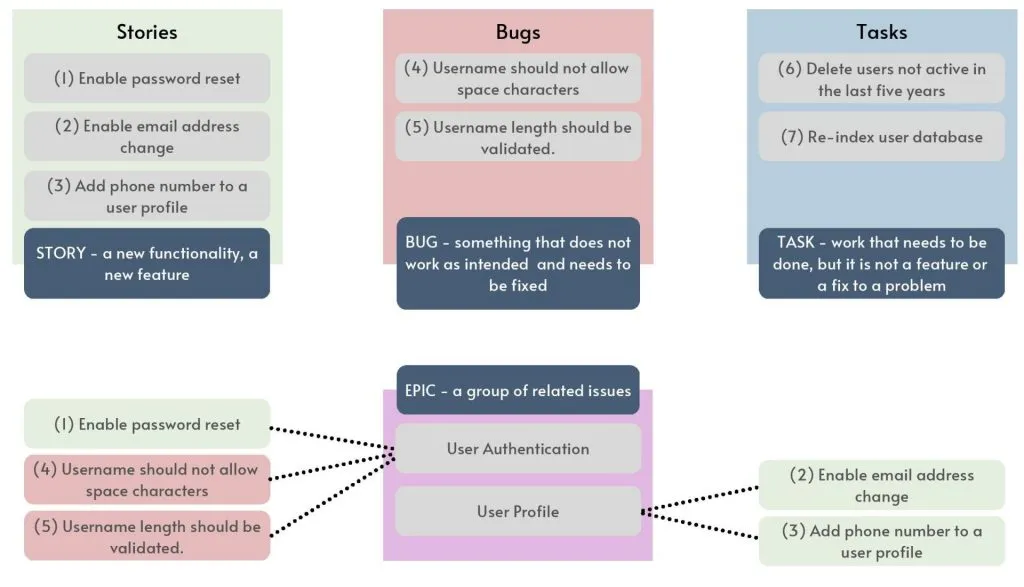
The two remaining items don’t seem to belong to any higher-level functionality, so we will leave them without the epic, which is perfectly fine. Belonging to an epic is not mandatory.
Frequently Asked Questions (FAQ) #
What are the main Jira issue types? #
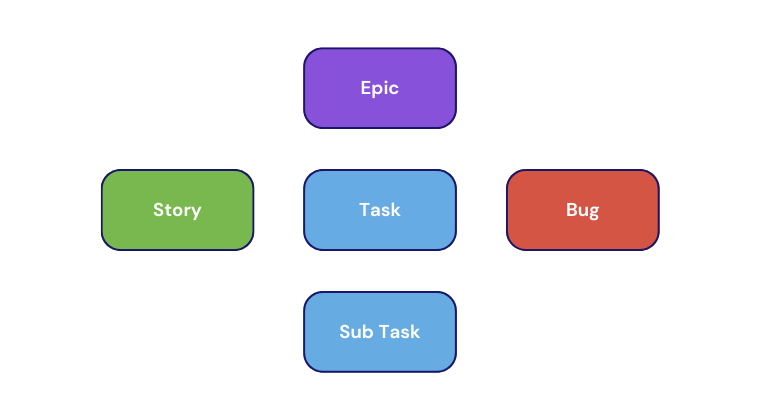
Jira’s main issue types include Epics, Stories, Tasks, Sub-tasks, and Bugs. Each type serves a specific purpose in project management.
How do I create custom issue types in Jira? #
To create new issue types, go to Jira administration settings, select “Issues,” and then “Issue Types.” Here, you can define new issue types with unique fields and workflows.
What is the difference between a parent issue and a child issue? #
A parent issue is a higher-level task that can encompass multiple child issues. Child issues are smaller tasks or stories that fall under the parent issue, helping to break down the work into manageable pieces.
How do I know which Jira issue type to use? #
Choose the issue type based on the nature of the work. Use Epics for large goals, stories for user-centric features, tasks for operational activities, and sub-tasks for detailed components. Bugs are used to track software issues.
Can I change an issue type after it has been created? #
Yes, you can change an issue type after it has been created by editing the issue and selecting a new type from the available options.
How do parent-child relationships work in Jira? #
Parent-child relationships in Jira involve linking an issue to its related child issues. This structure helps organize work and track progress across different hierarchy levels.
Conclusion #
Understanding and effectively using Jira issue types is essential for successful Agile development and project management. By mastering the default issue types, customizing them to fit your team’s specific needs, and organizing work through parent-child relationships, you can ensure that your projects are well-structured and efficiently managed. Explore and adapt Jira’s capabilities to suit your team’s workflow, and you’ll find that managing even the most complex projects becomes more manageable.
If you found this guide helpful, share it with your colleagues and subscribe to our blog for more tips on Agile project management and Jira. For further learning, check out our related articles and resources on Jira workflows, Agile development, and project management best practices.